
Ziying Cai
← All work

Lead Routing for Brivity CRM

Real estate admins were reading every new lead and picking an agent by hand. As the solo designer, I created rules that send each lead to the right agent the moment it arrives.

Role
Solo designer, end to end
Team
PM · Creative Director · Client Success · Dev
Company
Brivity
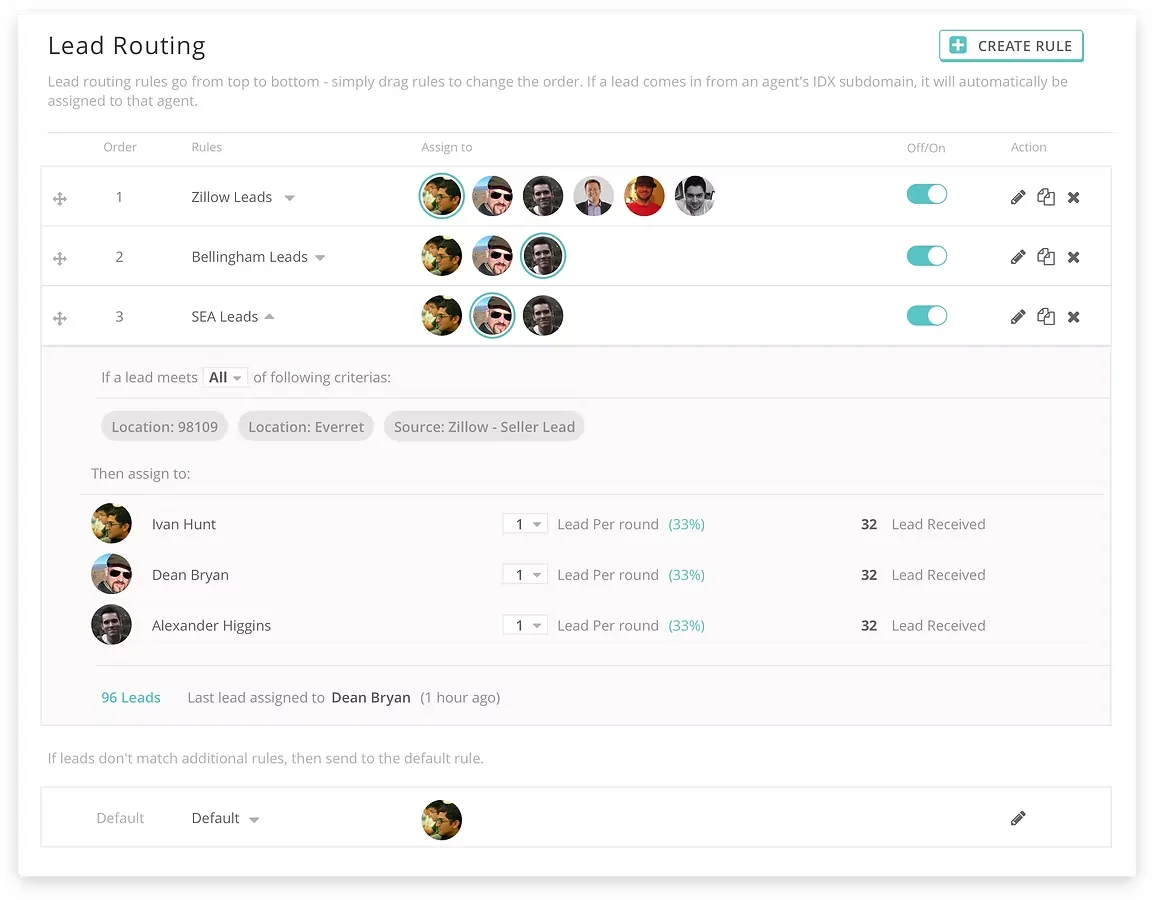
Lead Routing rules screen in Brivity CRM

The problem

Admins assigned every new lead by hand.
It was one of our most requested features to automate it.

Before

Lead comes in→Admin reads the profile→Picks an agent→Assigns by hand

After

Lead comes in→Rules match instantly→Agent is notified

What I heard from 2 admins and 3 Client Success teammates

  1. Reading a lead takes too long. Admins click through several pages to see what a lead wants.
  2. The matching rules live in people’s heads. Area, language, buyer vs seller, performance, weekend shifts — and they change with every hire.
  3. Speed wins deals. Leads arrive at any hour, and nobody can watch the page all day.

My design goal

Send every lead to the right agent instantly, with rules any admin can set up.

Key decisions

Three design questions I had to answer

01What should a rule match on?

I narrowed a long wish list to 5 criteria

With our Client Success specialist, I sorted every request by four tests: do most teams use it, can it be grouped, can we track it, and how hard is it to build.

IntentLocationSourcePrice rangeArrival time & day

02How should people build a rule?

I tested 3 rule builders before choosing

Each round went in front of admins and our Client Success team. Their feedback shaped the next version.

Round 1

Show every optionToo long. “Does it match any or all?”

Round 2

Add one condition at a timeClearer, but slow for complex rules.

Chosen · Round 3

One action barAdd any condition from one bar, see them all below. “People loved it.”

03How should leads be shared?

I made it fair by default, and adjustable

Leads rotate between agents so everyone gets a turn. A simple weight lets teams send more to their top performers.

Round-robinEvery agent gets leads fairly.
WeightingGive more leads to higher performers.
Real timeAssigned the moment a lead arrives.

The solution

Rules that run on their own

Lead Routing: ordered rules, criteria and agents
  • Check leads for youSet what info a lead needs, and Brivity validates it.
  • Order rules by priorityDrag to reorder, turn on and off, fall back to a default.
  • Reach leads firstAgents are notified the moment a lead is assigned.

Impact

“It really speeds up the process, allowing us to follow up in real time.”

— Admin, after launch

↓Fewer support tickets asking for lead routing
↑More teams using Lead Routing
0Manual steps to assign a new lead